Updates
August 17, 2026
A new usage system, credits, and Max in two sizes
This update changes how usage works in Anara. Every plan now includes one usage meter, with credits to keep you going on heavy weeks and a new choice of two Max sizes. On Free and Plus, the daily AI word and upload counts are gone. Pro now includes every model, including GPT 5.6 Sol, Opus 5, and Fable 5, previously only on Max. Prices haven't changed, and for most people day-to-day work won't feel any different.
How usage works now
Every plan comes with a set amount of AI usage, included at no extra cost. Chat messages, text generations in the note editor, View extractions, and file uploads count toward it, and more powerful models use it up faster. A single meter in the sidebar shows the percentage used and exactly when more frees up, in your timezone. The Free plan refreshes daily. Paid plans refresh weekly on a rolling basis, so one heavy day won't stop your week. Reading, annotating, organizing, and revisiting past answers never count. Read more in Understanding usage limits.
Credits, for when you need more
Paid plans can now add credits instead of waiting for a reset or upgrading. Your included usage is always used first; credits only kick in after it runs out. Workspace owners and admins can add them in a few clicks (members can request them), and an optional auto-refill keeps long projects moving. Credits roll over from month to month and expire 12 months after purchase. See Adding credits to your workspace.
Max now comes in two sizes
Max 5x includes 5 times Pro's usage, and Max 20x includes 20 times, with the same features: every model, Deep Search, and early access to new releases. If you subscribed to Max before the split, you keep your current price and get the full Max 20x limit, with nothing to do on your end. See Choosing between Max 5x and Max 20x.
If you're wondering where the old counters went, What changed with usage limits walks through it, and What happens when you reach your usage limit covers the moment itself: running work always finishes, your message stays in the composer, and everything you've made stays exactly where it is.
July 30, 2026
A new look, Views, Anara for Desktop and more

We're thrilled to introduce Anara's new look. In this update we're also releasing Views, Anara for Desktop, and seven new models on Pro.
Our new branding
Everything Anara tells you can be traced back to an exact passage in a real source. Citations are the core of the product, so we wanted the brand to carry them too. The asterisk already does this job in print. It sits beside a sentence and points you to the note that supports it, a small mark that stands for proof. That's the idea behind our new logo, a pair of asterisks.
Introducing Views, a new way to extract data from documents
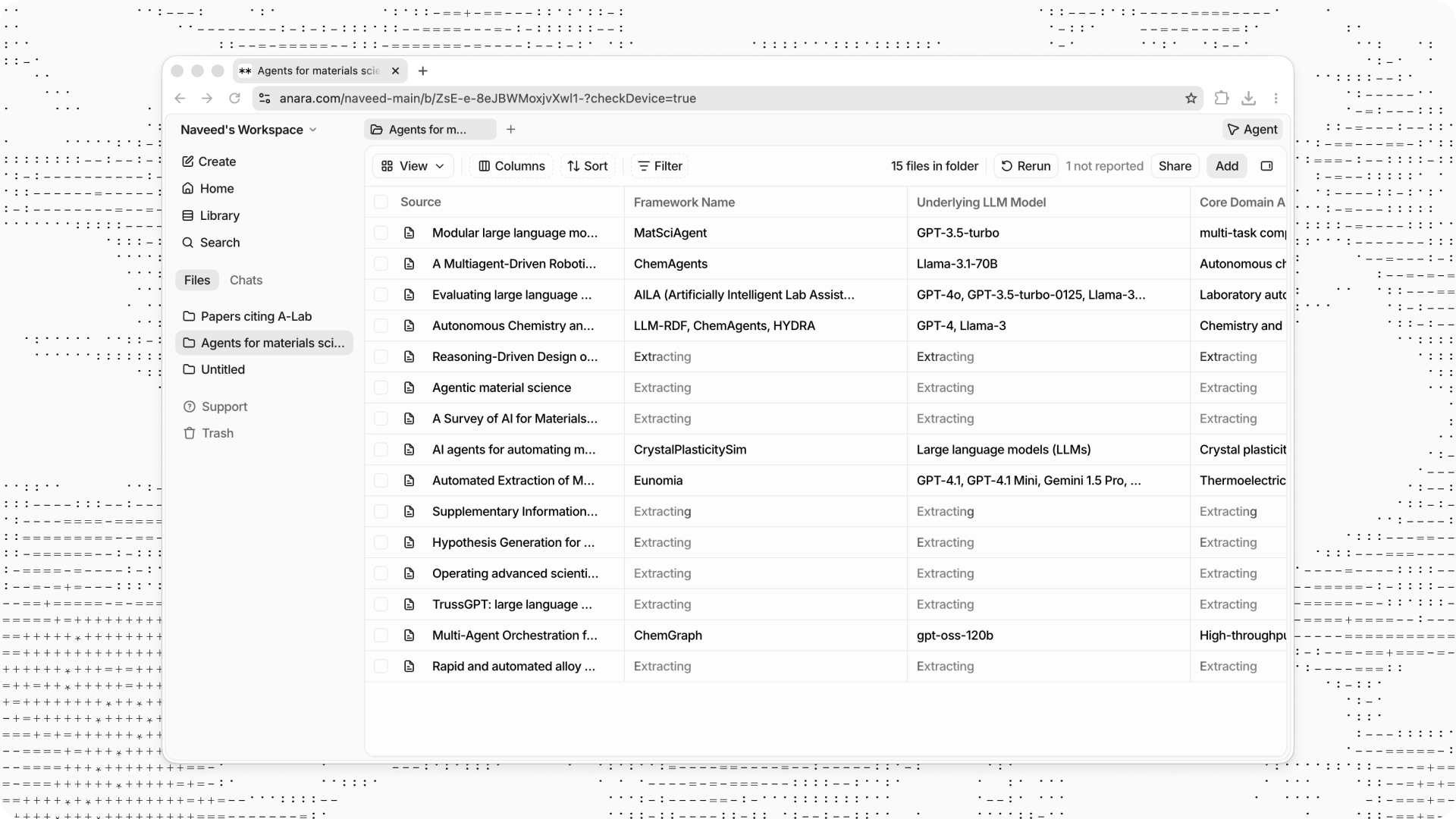
Views is the fastest way to extract specific information from a large set of documents at once. Open a folder, click View, then Create View, and describe what you want to know: sample size, methodology, key findings, anything you would otherwise dig out file by file.
Anara turns your questions into a table with one row per document and one column per question, then fills in every answer with a citation so you can verify it at the source. You can also ask the Anara agent to build or edit one for you. For a full walkthrough, check the guide on extracting data from a folder in our help center.
Anara for Desktop
Anara is now available as a desktop app for Mac. It sits in your Dock, one click away, and keeps your research separate from the clutter of browser tabs. Running on your Mac also lets Anara go further than a browser can. Soon it will be able to work with the files already on your device, not just the ones you upload. Download it at anara.com/download.
More models on Pro
GPT 5.6 Luna, Kimi K3, DeepSeek V4 Flash, MiniMax M3, and GLM 5.2 have joined the model picker for Pro accounts on US-based servers. Each model supports longer conversations and larger folders than the previous Pro models.
They have different strengths and speeds, so it's worth trying a few. For help picking the right model, check the guide on choosing models in our help center.
July 22, 2026
Sheets, a better editor, 10,000 citation styles and new models
Today spreadsheets come to Anara and the notes editor gets a big update, alongside more than 10,000 additional citation styles and the newest models from OpenAI, Anthropic, Google and xAI in chat.
Sheets
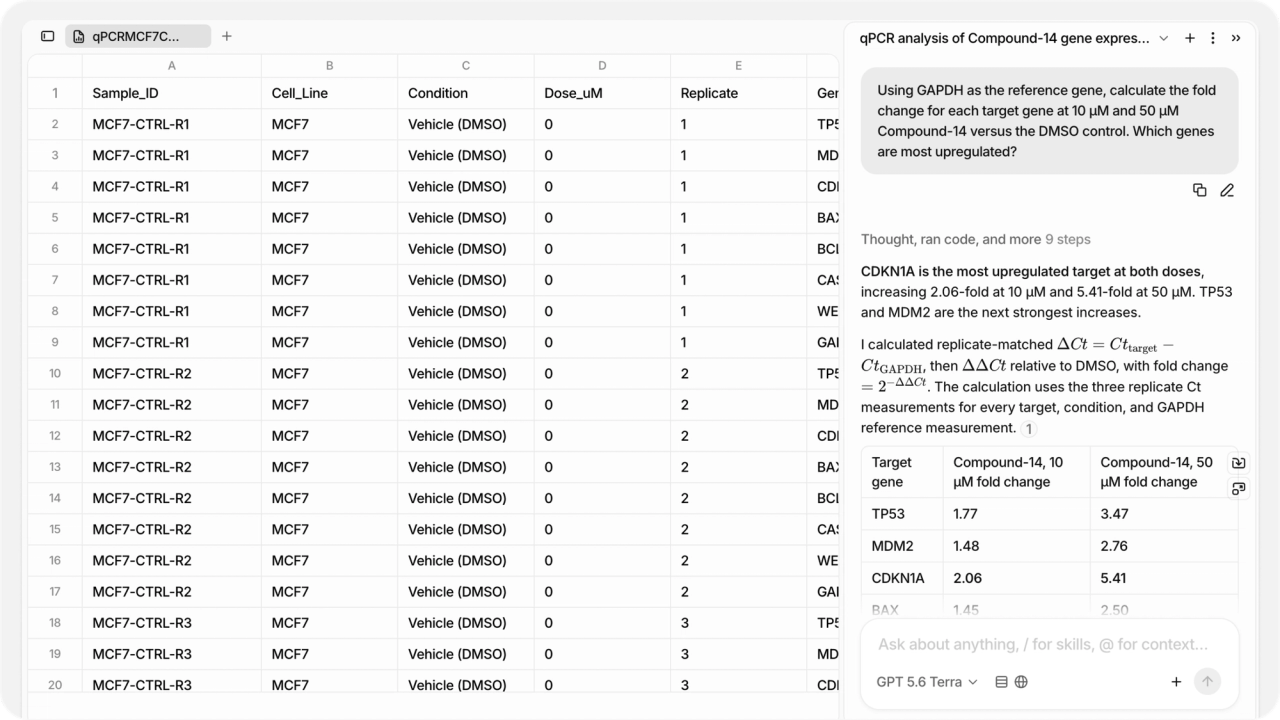
Science runs on data as much as it runs on papers, and we are working on making Anara just as good with the numbers as it is with the literature. Sheets is the first step. Upload an Excel or CSV file and you'll be able to edit cells, write formulas, work across multiple sheets, and export back to Excel or CSV with formulas intact. We also rebuilt how chat understands this kind of data. The agent reads a spreadsheet the way you do, as rows, columns, and formulas, so it can answer questions about even very large files, make edits for you, and cite the exact cells every answer came from.
A better writing experience
We rebuilt how you write in notes. Formatting now lives in a compact menu that appears when you select text, so the toolbar stays out of your way until you need it. Your citations have moved into the note sidebar, where you can see and search every source in one place as you write. And version history has been redesigned, so versions are grouped by when you made them and you can preview an earlier one before deciding to restore it.
10,000 citation styles
Citations in Anara used to come in 12 styles. They now come in more than 10,000, from APA, MLA, Chicago, and Vancouver to the house styles of individual journals. Search for the one your journal or institution uses, set it once, and every citation follows it, in chat and in your notes.
If your format is not in the catalog, create your own. Paste an example reference formatted the way you want and Anara generates the style for you. Refine it in plain language, for example asking for initials instead of full first names, then save it for your whole workspace. If you already have a CSL style file, you can upload that directly.
New models
The latest generation of models is available in chat. GPT 5.6 replaces GPT 5.5, Sonnet 5 replaces Sonnet 4.6, and Grok 4.5 replaces Grok 4.3. If you were using one of the previous versions, you have been moved to the new one automatically.
We have also added Fable 5 on the Max plan, Anthropic's most capable model for the hardest tasks. Fable restricts a lot of life sciences work that the other models allow, so for research in that area we recommend GPT 5.6 Sol.
July 3, 2026
Model council, quick explain, chat history search and soft delete
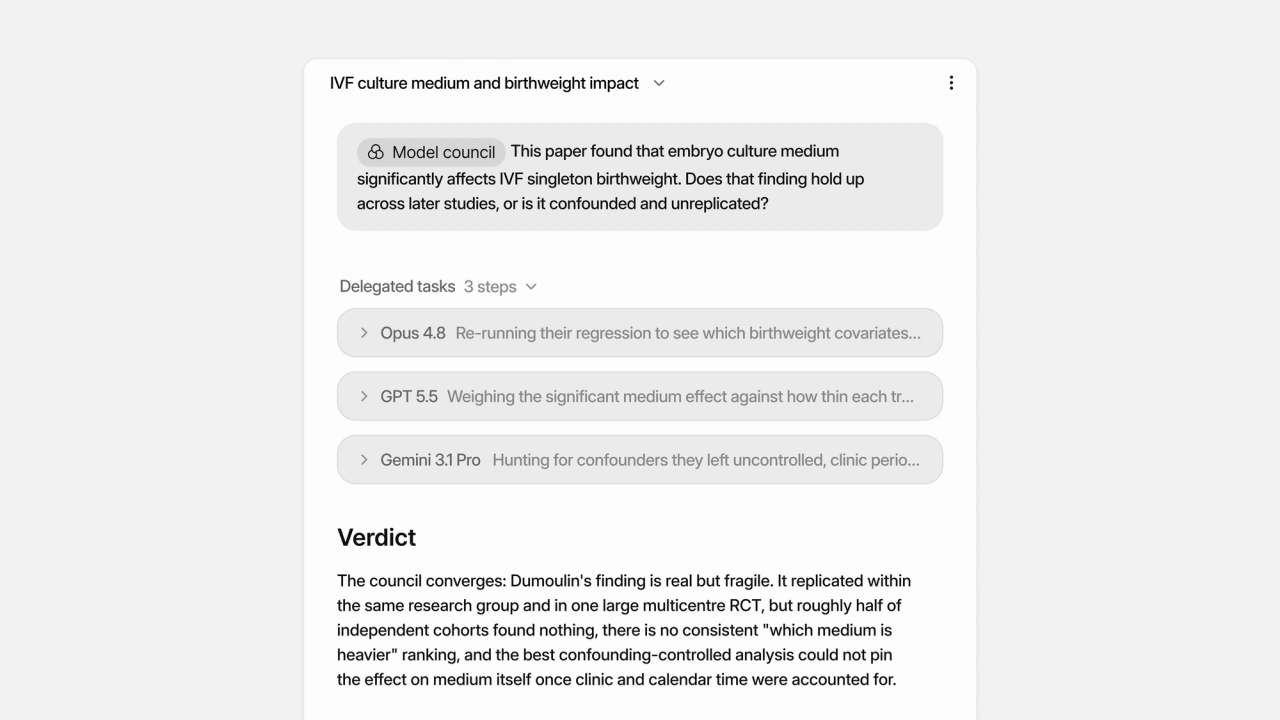
You can now put one question to three models at once and get a single synthesized answer, have anything you select explained in place while you read, search across every conversation you have ever had with Anara, and recover anything you delete for 30 days. Here is what's new.
Model Council
Model Council puts one question to three models in parallel and returns a single synthesized answer that leads with the verdict, then shows where the models agree, where they disagree, and what each one uniquely found. It is built for the moments you want a second opinion, like checking a hypothesis against the literature before you commit to it. To run one, type @ in the chat input and choose Model council from the Tools section; you can pick which models take part from the model selector at the bottom of the chat input. Available on the Max plan.
Explain, right in the viewer
Reading a dense paper and hit an unfamiliar term? Select any text in the PDF viewer and click Explain. Anara explains the selection using the rest of the document as context, so abbreviations, methods, and field-specific jargon are explained in terms of the paper you are actually reading, not generically. Explain works in chat too: select any text in a reply, including table cells, and get the same grounded explanation.
Search everything you have ever discussed
Your past conversations are now part of Anara's memory. When a question relates to something you discussed before, Anara can search across your previous chats and bring that context into its answer. Cmd+F inside a chat now searches the entire conversation, including messages that are not on screen, and matches partial words. Chats also name themselves automatically, and the names update as the conversation evolves, so your chat list stays easy to scan.
Soft delete
Deleted files, chats, and folders now move to the Trash instead of disappearing. You will find it in the left sidebar: filter, restore, or permanently delete anything from the last 30 days. Restoring a folder brings back everything inside it.
June 2, 2026
Skills, life science connectors and use Anara in other apps
You can now save and reuse your best prompts, search a new set of specialist life science databases, get an instant explanation of anything in a chat answer, and bring the Anara agent and your library into other apps you use. Here is what is new.
Save and reuse your best prompts with Skills
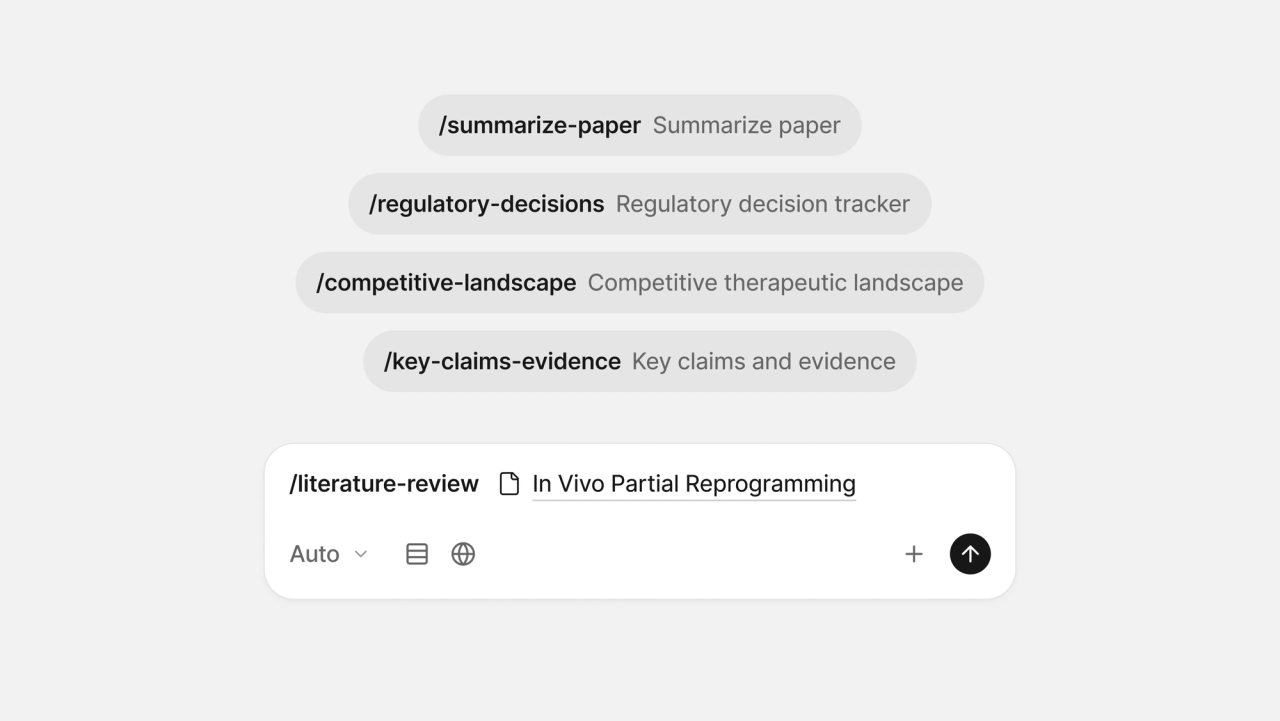
If you find yourself repeatedly entering the same kind of request, you can now save it as a Skill. Type / in any chat to open your prompt library, pick a Skill, and Anara drops the prompt in for you. Create and manage your Skills from Settings, where each one opens in the full chat editor, so you can build in @ mentions, files, and sources exactly like you would in a normal message. If you are not sure where to start, Settings includes a library of more than 100 ready-made Skills you can add in one click, spanning the life sciences, clinical practice and academia, with sets for law, finance, engineering, and policy too.
Anara for life sciences
New connectors let Anara reach specialist scientific platforms directly, making it easier to work across the discovery process, from literature review to data analysis.
BioRender connects Anara to its extensive library of vetted scientific figures, icons, and templates. The Protein Data Bank (PDB) provides access to experimentally determined 3D structures of proteins, nucleic acids, and larger molecular complexes. ChEMBL gives Anara curated bioactivity data on drug-like molecules and their targets. Open Targets surfaces the evidence linking genes and targets to diseases, alongside known drug pipelines. Connect any of them from Settings, and every result is cited back to its source database.
Bring Anara to your AI apps with MCP
You can now connect Anara to other AI apps that support connectors (via MCP, the open standard for linking AI tools), so they can search and read your library, and even call on the Anara agent itself, right alongside their own tools. Set it up from Settings under Connectors. Access is read-only: connected apps can read your library but never change it, and a clear consent screen lets you approve exactly what they can see before anything is shared.
Explain anything in a chat answer
Hit a term or sentence in a reply that you want unpacked? Highlight it and click Explain. A small popover streams a short, context-aware explanation of just that selection, without adding a new question to your conversation.